Dynamic Focus
Using Mappedin SDK for iOS with your own map requires a Pro license. Try a demo map for free or refer to the Pricing page for more information.
A single venue may include multiple nearby buildings, each contained within a FloorStack. Dynamic Focus enables seamless exploration across these buildings by revealing indoor content as the camera pans over each structure. There are two ways to implement Dynamic Focus.
The first approach is to use the DynamicFocus API. It provides a simple interface for implementing Dynamic Focus, allowing automatic switching between building facades and building maps as they move into and out of focus when the map is panned.
2. Dynamic Focus using MapView.updateState
The second approach is to use the MapView.updateState() method to update the map view when the camera pans over a building. This approach is more flexible and allows for more control over Dynamic Focus behavior, but it requires more code to implement. This can allow for custom behaviour, such as showing the building map of different elevations. This can be useful when floors of nearby buildings don't share the same elevation, such as when level 2 of one building is aligned with level 3 of another building. It could also allow for showing and hiding markers or labels when focus is transitioned to a new building.
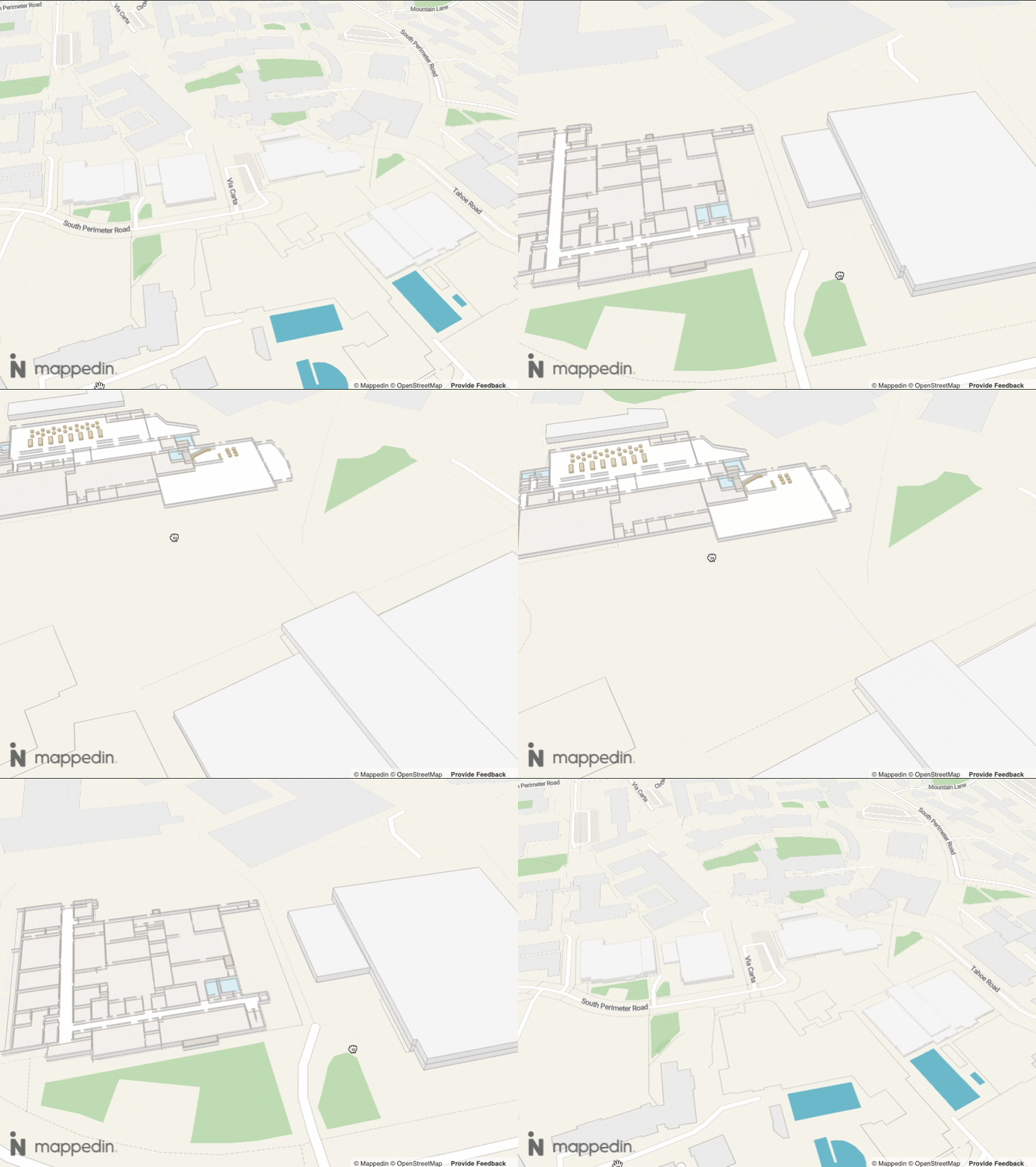
Mappedin Dynamic Focus with Auto Focus Enabled
Implementing the Mappedin Dynamic Focus API
The Mappedin Dynamic Focus API offers a simple API for implementing Dynamic Focus. If custom behaviour is required refer to the Implementing Dynamic Focus using MapView section.
A complete example demonstrating the Dynamic Focus API can be found in the Mappedin iOS GitHub repo: DynamicFocusDemoViewController.swift
Usage
Note that the MapView class instantiates the DynamicFocus class and exposes it as MapView.dynamicFocus. Use MapView.dynamicFocus to utilize DynamicFocus' methods.
Dynamic Focus can be enabled by calling DynamicFocus.enable(). When enabled, the Dynamic Focus will automatically transition the currently visible map from one building to the next as the camera pans over it.
The following example demonstrates how to enable Dynamic Focus with auto focus enabled, setting the floor on focus and specifying the indoor and outdoor zoom thresholds.
let options = DynamicFocusOptions(
  autoFocus: true,
  indoorZoomThreshold: 17.0,
  outdoorZoomThreshold: 17.0,
  setFloorOnFocus: true,
)

mapView.dynamicFocus.enable(options: options) { [weak self] result in
    guard let self = self else { return }
    if case .success = result {
        DispatchQueue.main.async {
            self.statusLabel.text = "Dynamic Focus enabled - zoom and pan to see auto focus"
        }
    }
}
To disable Dynamic Focus, call DynamicFocus.disable().
mapView.dynamicFocus.disable { [weak self] _ in
    DispatchQueue.main.async {
        self?.statusLabel.text = "Dynamic Focus disabled"
    }
    self?.refreshStateDisplay()
}
Dynamic Focus has a number of options that can be enabled either at instantiation or at any runtime by calling DynamicFocus.updateState.
Auto Focus
Dynamic Focus' auto focus provides default behavior to transition the currently visible map from one building to the next as the camera pans over it. The default behavior can be overridden by setting the DynamicFocusOptions.autoFocus option to false, allowing the developer to control the focus manually.
Setting FloorStack Default Floor
The default floor is the Floor that is visible when focus is transitioned to a new FloorStack (building). The default Floor for a FloorStack can be set by calling DynamicFocus.setDefaultFloorForStack() with the floor stack and floor ID. The default floor can be reset by calling DynamicFocus.resetDefaultFloorForStack() with the floor stack.
Implementing Dynamic Focus using MapView
Dynamic Focus can be implemented using the MapView.updateState method. This approach is more flexible and allows for full customization of Dynamic Focus behavior, but it requires more code to implement. For a simple implementation of Dynamic Focus, refer to the Mappedin Dynamic Focus API section.
A complete example demonstrating a Dynamic Focus implementation using MapView.updateState can be found in the Mappedin iOS GitHub repo: DynamicFocusManualDemoViewController.swift
Implementing Dynamic Focus using MapView.updateState requires the app to switch the visibility of a building Facade and Floor when the camera pans over a building. The Facade represents the look of the building from the outside, with its roof on. The Floor represents the look of the building from the inside, showing the indoor map.
Listen for Changes to Facades In view
The FacadesInViewChange event is emitted when the facades in view change. This event is emitted when the camera pans over a building. The event provides the list of facades in view. The app can use this event to update the visibility of the facades and floors. The first Facade in the array contains the one that is most centered in view.
// When facades come into view, switch to show that building's interior
mapView.on(Events.facadesInViewChange) { [weak self] payload in
    guard let self = self, let payload = payload else { return }

    self.logEvent("facades-in-view-change: \(payload.facades.count) facade(s)")

    // If a facade is in view, switch to that building
    if !payload.facades.isEmpty {
        let facade = payload.facades.first!
        let floorStackId = facade.floorStack

        // Only switch if it's a different building
        if floorStackId != self.currentSelectedFloorStackId {
            if let floorStack = self.allFloorStacks.first(where: { $0.id == floorStackId }) {
                print("[DynamicFocusManual] Facade in view - switching to building: \(floorStack.name)")
                // Don't focus camera - user is already panning to this location
                self.switchToBuilding(floorStack, focusCamera: false)
            }
        }
    } else {
        // No facades in view - switch to outdoor
        // Don't focus camera - user panned away, keep camera where it is
        if let outdoorFloorStack = self.allFloorStacks.first(where: { $0.type == .outdoor }),
            outdoorFloorStack.id != self.currentSelectedFloorStackId {
            print("[DynamicFocusManual] No facades in view - switching to outdoor")
            self.switchToBuilding(outdoorFloorStack, focusCamera: false)
        }
    }
}
The following code demonstrates how to switch to a building by manually managing facades and floors. This does not call setFloorStack or setFloor for buildings - instead it manages visibility of floors and facades directly while staying on the outdoor floor. This allows facades to remain rendered while showing building interiors. If the user has previously selected a floor, it will be restored when the building is switched to. If the user hasn't previously selected a floor a floor matching the current elevation will be shown if available, if not the default floor will be shown.
/// Switch to viewing a building by manually managing facades and floors.
/// This does NOT call setFloorStack or setFloor for buildings - instead it manages
/// visibility of floors and facades directly while staying on the outdoor floor.
/// This allows facades to remain rendered while showing building interiors.
/// - Parameter focusCamera: Whether to focus the camera on the target. Set to false when
///   switching due to panning (facades-in-view-change with 0 facades) to avoid snapping back.
private func switchToBuilding(_ floorStack: FloorStack, focusCamera: Bool = true) {
    currentSelectedFloorStackId = floorStack.id

    print("[DynamicFocusManual] switchToBuilding: \(floorStack.name) (\(floorStack.id)) focusCamera=\(focusCamera)")

    // Check if this is an Outdoor-type floor stack
    let isOutdoor = floorStack.type == .outdoor

    if isOutdoor {
        // Switching to Outdoor - close the previously open facade (if any)
        print("[DynamicFocusManual]   Switching to Outdoor view")

        // Only close the facade that was previously opened (not all facades)
        if let openFacadeId = currentlyOpenFacadeId,
            let facadeToClose = allFacades.first(where: { $0.id == openFacadeId }) {
            closeFacade(facadeToClose)
        }
        currentlyOpenFacadeId = nil

        // Set floor to the outdoor floor
        let defaultFloorId = floorStack.defaultFloor
        if let floor = getFloorById(defaultFloorId) {
            mapView.setFloor(floorId: defaultFloorId)
            // Only focus if explicitly requested (e.g., from picker selection)
            if focusCamera {
                mapView.camera.focusOn(floor: floor)
            }
        }
    } else {
        // Switching to a Building - open its facade (hide it) and show its floors
        print("[DynamicFocusManual]   Switching to Building: \(floorStack.name)")

        // Find the facade for the new building
        let newFacade = allFacades.first { $0.floorStack == floorStack.id }

        // Close the previously open facade (if different from the new one)
        if let openFacadeId = currentlyOpenFacadeId,
            openFacadeId != newFacade?.id,
            let facadeToClose = allFacades.first(where: { $0.id == openFacadeId }) {
            closeFacade(facadeToClose)
        }

        // Open the new building's facade (if it has one)
        if let facade = newFacade {
            openFacade(facade)
            currentlyOpenFacadeId = facade.id
        } else {
            // Building has no facade - clear the tracking variable to avoid
            // attempting to close an already-closed facade on subsequent transitions
            currentlyOpenFacadeId = nil
            // Still need to show floors even without a facade, otherwise
            // the building interior would be invisible
            showFloors(building: floorStack)
        }

        // Determine which floor to show:
        // 1. Use stored preference for this building (highest priority)
        // 2. Try to find a floor matching current elevation
        // 3. Fall back to default floor
        let floorsInStack = getFloorsForFloorStack(floorStack)
        let storedPref = floorToShowByBuilding[floorStack.id]
        let elevationMatch = floorsInStack.first { $0.elevation == currentElevation }
        let defaultFloor = getFloorById(floorStack.defaultFloor)

        let floorToShow = storedPref ?? elevationMatch ?? defaultFloor

        if let floor = floorToShow {
            // Store this as the preference for this building
            floorToShowByBuilding[floorStack.id] = floor
            // Update the global elevation tracker
            currentElevation = floor.elevation

            // NOTE: We do NOT call mapView.setFloor() here!
            // Calling setFloor causes the SDK to internally manage facades, hiding all
            // facades except the active building's. Instead, we manually manage visibility
            // using updateState/animateState while staying on the outdoor floor conceptually.
            // Floor visibility is handled via showFloors() called above.

            // Only focus camera if explicitly requested (e.g., from picker selection)
            if focusCamera {
                mapView.camera.focusOn(floor: floor)
            }
        }
    }
}

private func openFacade(_ facade: Facade) {
    guard let floorStack = allFloorStacks.first(where: { $0.id == facade.floorStack }) else { return }

    print("[DynamicFocusManual] openFacade: \(floorStack.name) (setting opacity to 0)")

    // First, show the floor we want to see
    showFloors(building: floorStack)

    // Animate the facade out (hide it to reveal interior)
    mapView.animateState(facade: facade, state: FacadeUpdateState(opacity: 0.0))
}

private func closeFacade(_ facade: Facade) {
    let floorStack = allFloorStacks.first { $0.id == facade.floorStack }

    print("[DynamicFocusManual] closeFacade: \(floorStack?.name ?? "unknown") (setting opacity to 1)")

    // Animate the facade in (show it to hide interior)
    mapView.animateState(facade: facade, state: FacadeUpdateState(opacity: 1.0)) { [weak self] _ in
        guard let self = self, let floorStack = floorStack else { return }
        // Hide all floors for this building after animation completes
        let floorsInBuilding = self.getFloorsForFloorStack(floorStack)
        floorsInBuilding.forEach { floor in
            self.mapView.updateState(
                floor: floor,
                state: FloorUpdateState(visible: false)
            )
        }
    }
}
Listen for Changes to the Floor
The floorChange event is emitted when the floor changes, for example when the user selects a new floor from a floor selector or when they click on a navigation marker to go up or down stairs or an elevator. The event provides the new floor. The app can use this event to update the visibility of the facades and floors.
// Act on the floor-change event to update the level selector
mapView.on(Events.floorChange) { [weak self] payload in
    guard let self = self, let payload = payload else { return }

    let newFloor = payload.floor
    guard let newFloorStack = newFloor.floorStack else { return }
    let newFloorStackId = newFloorStack.id
    print("[DynamicFocusManual] floor-change: \(newFloor.name) (floorStackId=\(newFloorStackId))")

    // Store this floor as the preference for its floor stack
    // This preserves user selections across building switches
    self.floorToShowByBuilding[newFloorStackId] = newFloor

    // Only update elevation for non-outdoor floors
    // Switching to outdoor shouldn't reset the current elevation
    let isOutdoorFloor = newFloorStack.type == .outdoor
    if !isOutdoorFloor {
        self.currentElevation = newFloor.elevation
    }

    self.logEvent("floor-change: \(newFloor.name) (\(newFloorStack.name))")
}