Points of Interest
Using Mappedin SDK for iOS with your own map requires a Pro license. Try a demo map for free or refer to the Pricing page for more information.
Points of Interest (POIs) are specific locations or features on a map that users find useful or informative. POIs serve as landmarks or markers, highlighting key places, services, or objects to enhance the map's utility and user experience.
They are contained in the PointOfInterest class, which contains a coordinate, name, description, images, links and the floor the point of interest exists on. All of these elements are configured in Mappedin Maker.
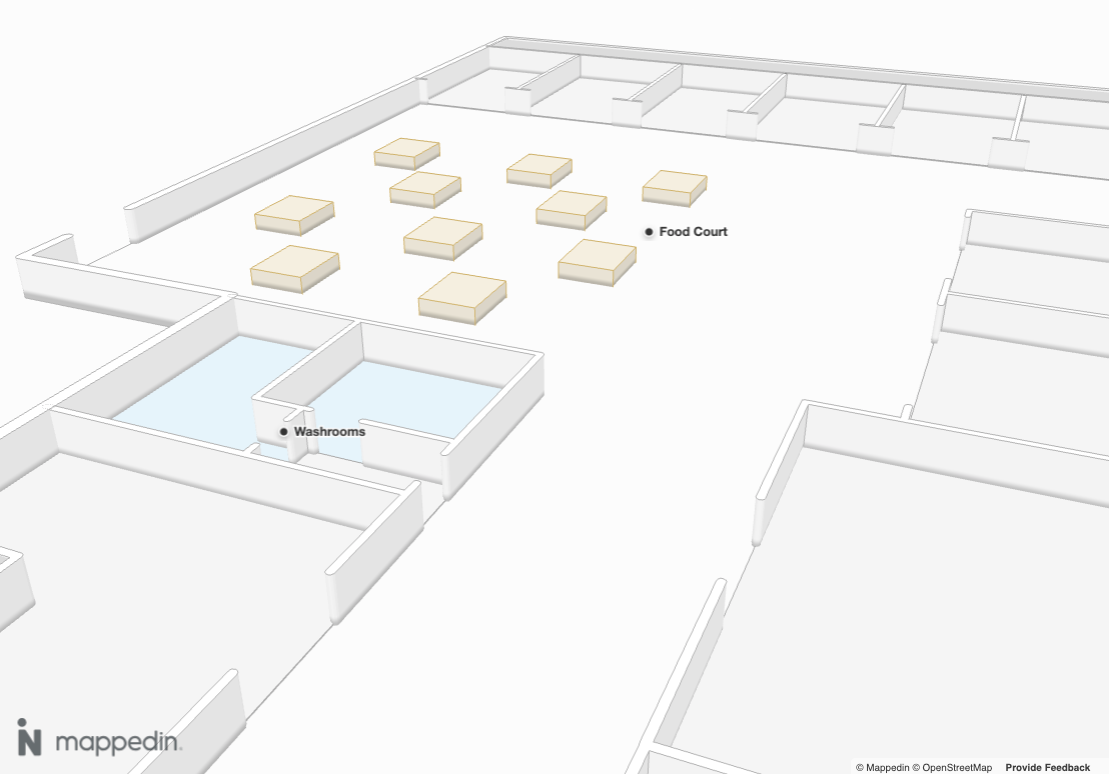
PointOfInterest.name could be used to create labels to show users helpful information. The following sample code demonstrates one possible use for PointOfInterest. It labels each PointOfInterest and uses Camera.animateTo() to create a flyby of each one.
import UIKit
import Mappedin
import Foundation

final class DisplayMapDemoViewController: UIViewController {
    private let mapView = MapView()
    private let loadingIndicator = UIActivityIndicatorView(style: .large)
    private let animationDuration = 4000

    override func viewDidLoad() {
        super.viewDidLoad()
        title = "Display a Map"
        view.backgroundColor = .systemBackground

        let container = mapView.view
        container.translatesAutoresizingMaskIntoConstraints = false
        view.addSubview(container)

        // Add loading indicator
        loadingIndicator.translatesAutoresizingMaskIntoConstraints = false
        loadingIndicator.startAnimating()
        view.addSubview(loadingIndicator)

        NSLayoutConstraint.activate([
            container.leadingAnchor.constraint(equalTo: view.leadingAnchor),
            container.trailingAnchor.constraint(equalTo: view.trailingAnchor),
            container.topAnchor.constraint(equalTo: view.topAnchor),
            container.bottomAnchor.constraint(equalTo: view.bottomAnchor),

            loadingIndicator.centerXAnchor.constraint(equalTo: view.centerXAnchor),
            loadingIndicator.centerYAnchor.constraint(equalTo: view.centerYAnchor),
        ])

		// See Trial API key Terms and Conditions
		// https://developer.mappedin.com/docs/demo-keys-and-maps
        let options = GetMapDataWithCredentialsOptions(
            key: "mik_yeBk0Vf0nNJtpesfu560e07e5",
            secret: "mis_2g9ST8ZcSFb5R9fPnsvYhrX3RyRwPtDGbMGweCYKEq385431022",
            mapId: "65c0ff7430b94e3fabd5bb8c"
        )
		// Load the map data.
        mapView.getMapData(options: options) { [weak self] r in
            guard let self = self else { return }
            if case .success = r {
                print("getMapData success")
				// Display the map.
                self.mapView.show3dMap(options: Show3DMapOptions()) { r2 in
                    if case .success = r2 {
                        DispatchQueue.main.async {
                            self.loadingIndicator.stopAnimating()
                        }
						self.onMapReady()
                    } else if case .failure(let error) = r2 {
                        DispatchQueue.main.async {
                            self.loadingIndicator.stopAnimating()
                        }
                        print("show3dMap error: \(error)")
                    }
                }
            } else if case .failure(let error) = r {
                print("getMapData error: \(error)")
            }
        }
    }

	// Place your code to be called when the map is ready here.
	private func onMapReady() {
		print("show3dMap success - Map displayed")

		// Get the map center as the starting point for bearing calculations.
		mapView.mapData.mapCenter { [weak self] centerResult in
			guard let self = self else { return }

			if case .success(let mapCenter) = centerResult, let mapCenter = mapCenter {
				// Get all points of interest.
				self.mapView.mapData.getByType(.pointOfInterest) { [weak self] (result: Result<[PointOfInterest], Error>) in
					guard let self = self else { return }

					if case .success(let pois) = result {
						// Start iterating through POIs with initial position from map center.
						self.animateThroughPOIs(
							pois: pois,
							index: 0,
							startLat: mapCenter.latitude,
							startLon: mapCenter.longitude
						)
					} else if case .failure(let error) = result {
						print("Failed to get POIs: \(error)")
					}
				}
			} else if case .failure(let error) = centerResult {
				print("Failed to get map center: \(error)")
			}
		}
	}

	/// Recursively animates through each point of interest.
	private func animateThroughPOIs(
		pois: [PointOfInterest],
		index: Int,
		startLat: Double,
		startLon: Double
	) {
		guard index < pois.count else {
			print("Finished animating through all POIs")
			return
		}

		let poi = pois[index]

		// Label the point of interest.
		mapView.labels.add(target: poi.coordinate, text: poi.name)

		// Calculate the bearing between the current position and the POI.
		let bearing = calcBearing(
			startLat: startLat,
			startLng: startLon,
			destLat: poi.coordinate.latitude,
			destLng: poi.coordinate.longitude
		)

		// Animate to the current point of interest.
		mapView.camera.animateTo(
			target: CameraTarget(
				bearing: bearing,
				center: poi.coordinate,
				pitch: 80.0,
				zoomLevel: 50.0
			),
			options: CameraAnimationOptions(
				duration: animationDuration,
				easing: .easeOut
			)
		)

		// Wait for the animation to complete before moving to the next POI.
		DispatchQueue.main.asyncAfter(deadline: .now() + .milliseconds(animationDuration)) { [weak self] in
			self?.animateThroughPOIs(
				pois: pois,
				index: index + 1,
				startLat: poi.coordinate.latitude,
				startLon: poi.coordinate.longitude
			)
		}
	}

	/// Calculate the bearing between two points.
	private func calcBearing(startLat: Double, startLng: Double, destLat: Double, destLng: Double) -> Double {
		let startLatRad = toRadians(startLat)
		let startLngRad = toRadians(startLng)
		let destLatRad = toRadians(destLat)
		let destLngRad = toRadians(destLng)

		let y = sin(destLngRad - startLngRad) * cos(destLatRad)
		let x = cos(startLatRad) * sin(destLatRad) -
			sin(startLatRad) * cos(destLatRad) * cos(destLngRad - startLngRad)
		var brng = atan2(y, x)
		brng = toDegrees(brng)
		return (brng + 360).truncatingRemainder(dividingBy: 360)
	}

	/// Converts from degrees to radians.
	private func toRadians(_ degrees: Double) -> Double {
		return degrees * .pi / 180
	}

	/// Converts from radians to degrees.
	private func toDegrees(_ radians: Double) -> Double {
		return radians * 180 / .pi
	}
}