Annotations
Using Mappedin SDK for Android with your own map requires a Pro license. Try a demo map for free or refer to the Pricing page for more information.
Map annotations add visual or textual elements to maps, providing extra information about specific locations or features. Map makers can choose from many annotations included in Mappedin Maker to add to a map and access them using Mappedin SDKs.
A complete example demonstrating Annotations with icons can be found in the Mappedin Android GitHub repo: MarkersDemoActivity.kt
Annotations are organized into the following groups. These are just a few examples of annotations, each group contains many more.
| Annotation Group | Examples |
|---|---|
| Access Features | Keybox, roof access |
| Building Sides | Alpha, bravo, charlie, delta |
| Equipment Rooms | Boiler Room, Sprinkler control room |
| Fire Ratings | Fire and smoke wall 1 hour, firewall 3 hours |
| Fire Safety | Fire Blanket, Fire Hose Reel |
| General Systems | Emergency Generator, Smoke Control Panel |
| Hazards | Biohazard, Explosive |
| Safety | Accessible Elevator, Eyewash Station |
| Utility Shutoff | Gas Valve, Main Water Valve |
| Ventilation | Chimney, Exhaust Fan |
| Water Connections | Sprinkler FDC, Public Hydrant |
| Water Systems | Fire Pump, Pressurized Water Tank |
Incorporating annotations help provide a safer space for all. It allows users to easily locate key elements in the map.
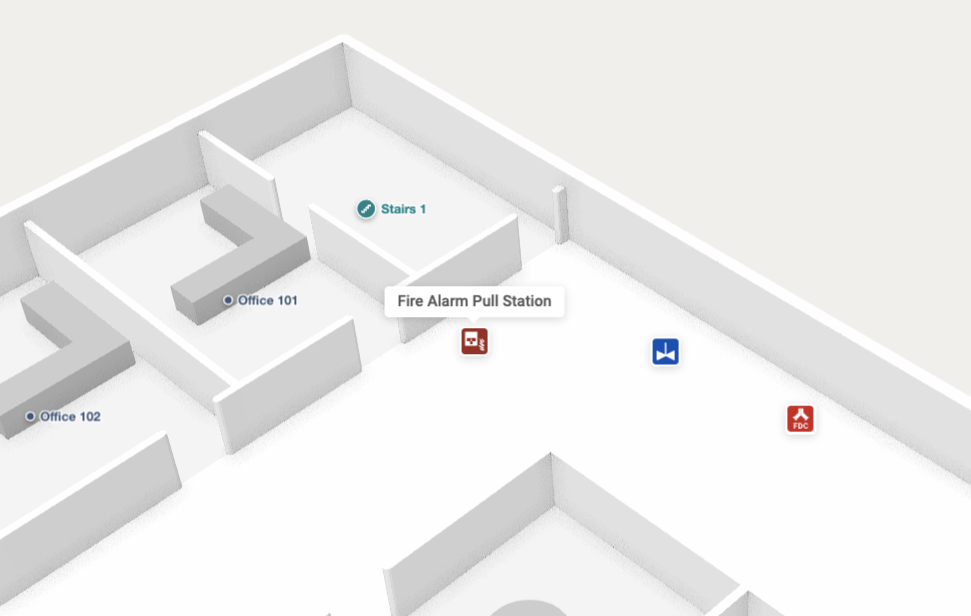
Using Annotations
An app may choose to display all annotations, annotations of a specific group or no annotations at all. The following code sample logs the name of each annotation.
mapView.mapData.getByType<Annotation>(com.mappedin.models.MapDataType.ANNOTATION) { r ->
  r.onSuccess { annotations ->
    // Add markers for all annotations that have icons.
    annotations.forEach { annotation ->
      Log.d("Annotation", annotation.name)
    }
  }
}
Annotation Icons
Mappedin provides a set of icons to represent annotations. The example below demonstrates using these icons and placing them as Markers on the map. Annotation.icon.url contains the URL of the icon to use.
A complete example demonstrating Annotations with icons can be found in the Mappedin Android GitHub repo: MarkersDemoActivity.kt
mapView.mapData.getByType<Annotation>(com.mappedin.models.MapDataType.ANNOTATION) { r ->
  r.onSuccess { annotations ->
    val opts =
      AddMarkerOptions(
        interactive = AddMarkerOptions.Interactive.True,
        placement = AddMarkerOptions.Placement.Single(MarkerPlacement.CENTER),
        rank = AddMarkerOptions.Rank.Tier(CollisionRankingTier.HIGH),
      )

    // Add markers for all annotations that have icons.
    annotations.forEach { annotation ->
      val iconUrl = annotation.icon?.url
      val markerHtml =
        """
        <div class='mappedin-annotation-marker'>
          <div style='width: 30px; height: 30px'>
          <img src='$iconUrl' alt='${annotation.name}' width='30' height='30' />
          </div>
        </div>
        """.trimIndent()
      mapView.markers.add(annotation, markerHtml, opts) { }
    }

    // Remove markers that are clicked on.
    mapView.on(Events.Click) { clickPayload ->
      val clickedMarker = clickPayload?.markers?.firstOrNull() ?: return@on
      mapView.markers.remove(clickedMarker) { }
    }
  }
}